How to Join MasteryPrep Virtual Classroom
If you are a student trying to access your virtual classroom, there are two ways to do so.
1. Classroom Link (*Most common*)
Your school or teacher will give you and your classmates a unique link to click to join your class. There is typically no password required. The link will look something like this: https://smart.newrow.com/#/room/xyz-123 (Do not click. This is not a real link.)
2. Launch Class from MasteryPrep Platform
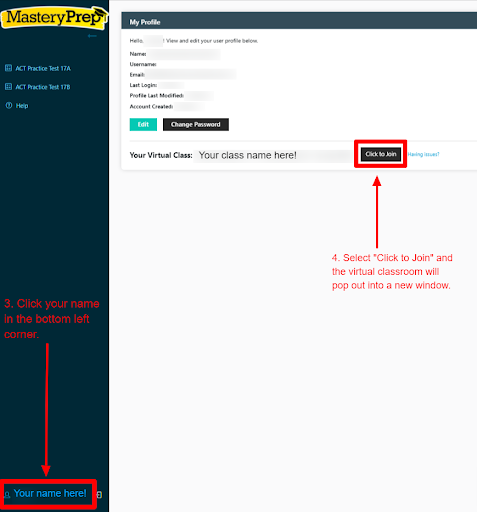
If your district is implementing a large-scale series of classes, we may have your MasteryPrep Platform account linked to your virtual classroom. You can join from the MasteryPrep Platform using the instructions below:
- Visit app.masteryprep.com
- Login using the login credentials distributed by your school.
- Email address: your school email address or assigned username
- Password: assigned password
- Click your name in the bottom left corner.
- Select “Click to Join” and the virtual classroom will pop out into a new window.